
Hams Over IP – Modern Networking for Amateur Radio
What it is, how it works, and how to get started with SIP phones, softphones, and RF gateways.
Abosolute Tech Net presentation Podcast link here.
1. What Is Hams Over IP?
Hams Over IP (HOIP) is a SIP-based communications system designed for licensed amateur radio operators. It functions like a ham-only VoIP network: users receive extensions, register compatible endpoints, and place calls across the HOIP backbone. In some cases, HOIP can interface with RF gateways where operators have built and authorized those integrations.
With HOIP you can:
- Call other operators by extension.
- Use SIP desk phones, softphones, and mobile SIP apps.
- Experiment with modern networked audio in a ham-radio context.
- Optionally connect through RF gateways where supported and authorized.
2. Why Hams Over IP Exists
HOIP gives amateurs a structured, modern way to communicate and experiment without requiring every user or club to build a full VoIP backend from scratch. It also creates a consistent “dial-by-extension” experience with good audio quality and predictable routing.
- Learning & experimentation: SIP, RTP, codecs, NAT traversal, and VoIP troubleshooting.
- Coordination: nets, club operations, and remote participation.
- Resilience: an alternate communications path when RF coverage is limited.
- Integration: optional gateways into RF systems when properly designed and authorized.
3. How Hams Over IP Works
3.1 Core building blocks
- Directory / Extensions: your identity and how you dial others.
- SIP servers & proxies: registration, authentication, and signaling routing.
- Endpoints: desk phones, softphones, smartphone apps, and gateways.
- RTP media: the audio stream once a call is established.
3.2 What SIP is
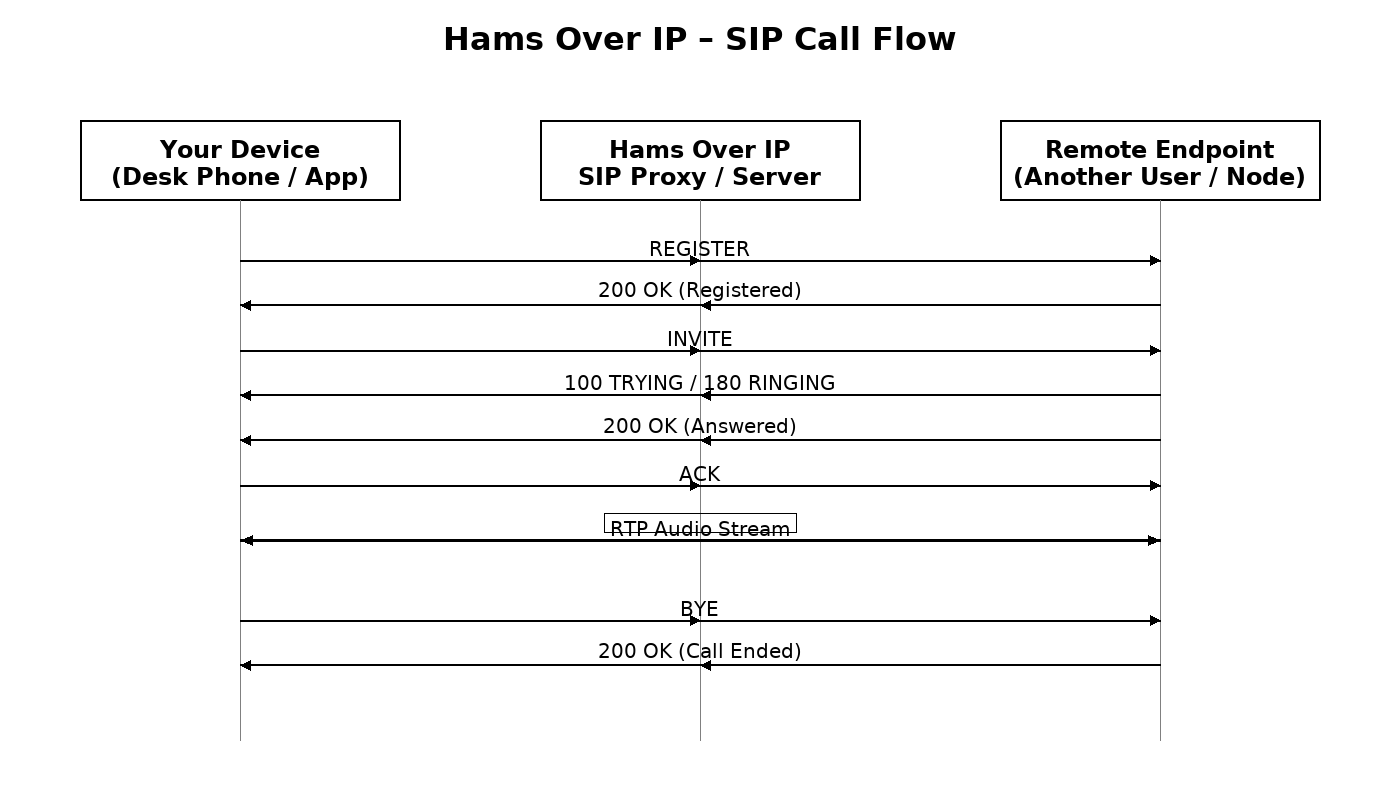
SIP (Session Initiation Protocol) is the signaling protocol that sets up, manages, and ends calls. SIP handles registration (your device coming online), call setup (INVITE), ringing/answering (200 OK), and teardown (BYE). SIP does not carry the voice audio.
3.3 What SIP proxies do
A SIP proxy is the call traffic director. In HOIP terms, proxies typically:
- Authenticate devices and keep track of where each extension is registered.
- Route SIP signaling so calls reach the right endpoint or gateway.
- Help manage NAT/firewall realities so endpoints remain reachable.
- Support redundancy and load distribution across infrastructure.
- Provide logs/diagnostics that help troubleshoot registration and call setup issues.
4. Example Hardware: SIP Desk Phone
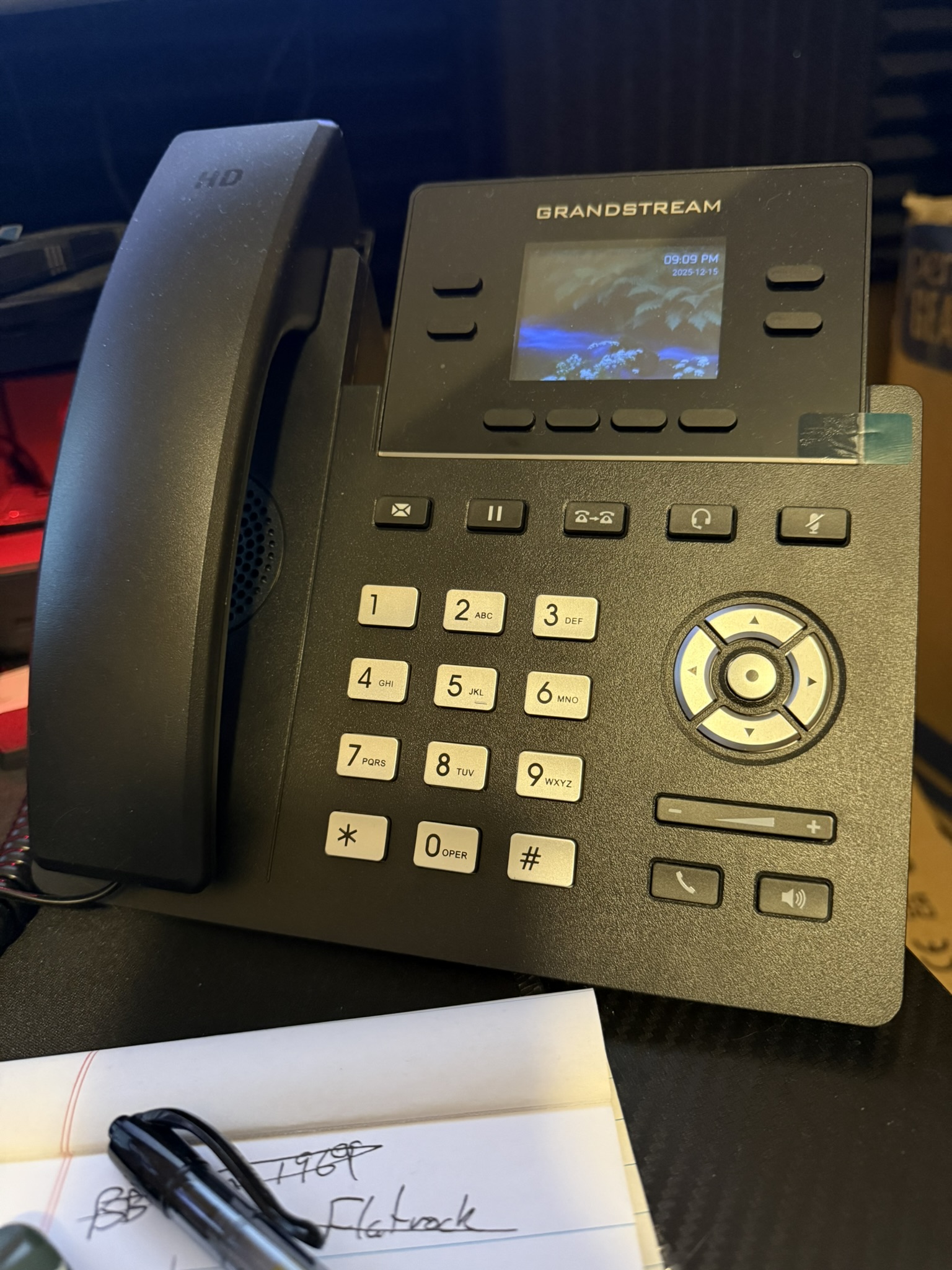
A SIP desk phone is one of the most “appliance-like” ways to use HOIP in the shack. Once configured, it stays registered, has consistent audio, and doesn’t depend on a PC or a phone app staying alive in the background.
- Best for: frequent HOIP use, net control, and a fixed operating position.
- Why it’s reliable: stable registration, hardware controls, predictable audio chain.
- Typical settings: SIP server/domain, extension, auth ID, password, codec (often
PCMU/G.711u).
5. SIP Call Flow Diagram
This diagram shows a typical HOIP call: registration, call setup signaling, and the RTP audio stream once the call is established.
5.1 Quick walk-through
- Your device sends REGISTER so the system knows where to reach your extension.
- You dial an extension and send an INVITE.
- The proxy routes signaling to the destination endpoint and returns ringing/answer messages.
- After ACK, RTP audio begins flowing.
- BYE ends the call cleanly.
6. Getting Started: Step-by-Step
- Request an HOIP extension and credentials.
- Choose an endpoint: softphone, mobile app, or desk phone.
- Configure your SIP account using the provided server/domain and credentials.
- Confirm registration (device shows “Registered” or “Online”).
- Place a test call, then call another operator by extension.
6.1 Common configuration fields
- SIP Server / Domain (from HOIP)
- User / Extension
- Auth ID (often the same as the extension)
- Password
- Codec: start with
PCMU (G.711 u-law)unless instructed otherwise
7. Device & App Options
7.1 Softphones (Computer)
- Examples: Zoiper, MicroSIP (Windows), Linphone
- Use a quality headset and confirm the correct input/output devices.
7.2 Smartphone SIP Apps
- Examples: Zoiper, GS Wave, Linphone Mobile
- Watch OS battery optimization that can kill background registrations.
7.3 SIP Desk Phones
- Examples: Grandstream, Yealink, Polycom, Cisco SPA (older)
- Wired Ethernet usually provides the most stable experience.
7.4 Gateways and RF integration
Some stations connect HOIP to RF through gateways or node controllers. This is where policies and engineering matter: avoid accidental bridging loops, coordinate with system admins/trustees, and build in clear control/ID behavior.
8. Tips & Troubleshooting
- Disable SIP ALG if you see one-way audio or unexpected drops.
- Prefer wired connections for desk phones when possible.
- Set mic gain carefully; avoid aggressive AGC that pumps noise.
- When things fail: verify credentials, server/domain spelling, then check logs.
- Keep firmware/software current (especially on desk phones).
9. Real-World Use Cases
- Net control operations and backup NCS coordination
- Club communications and worldwide operator-to-operator calling
- Travel/remote participation using a mobile SIP endpoint
- Training sessions on SIP/RTP, NAT, and VoIP troubleshooting
- Emergency preparedness as an alternate voice path when RF is limited
10. PSTN / Autopatch Considerations
Because HOIP uses SIP, operators often ask if it can connect to regular telephone numbers like older repeater autopatches. HOIP is designed as a ham-only network and does not provide general PSTN calling.
FCC Part 97 restricts using amateur systems as a substitute for telephone service. While autopatches historically existed under strict limitations, general-purpose PSTN connectivity is not the goal of HOIP.
11. Wrap-Up
Hams Over IP brings modern VoIP concepts into amateur radio in a practical and consistent way. Start simple: request an extension, register one endpoint, verify audio quality, then expand into desk phones or gateway projects once the basics are solid.
FAQ
Do I need a license?
Yes. HOIP is intended for licensed amateur operators.
What codec should I start with?
PCMU (G.711 u-law) is a common starting point because it’s widely supported and stable.
Can I link RF systems?
Sometimes—via gateways or node integrations. Coordinate with system admins and local trustees before permanent links.
Can HOIP connect to regular telephone numbers (PSTN) like an autopatch?
No general PSTN calling. HOIP is designed as a ham-only network and must remain within Part 97 requirements.